
Blueprint Usage
TrackEdge is fully Blueprint compatible.No C++ knowledge is required.All analytics functions are exposed as Async Blueprint Nodes.
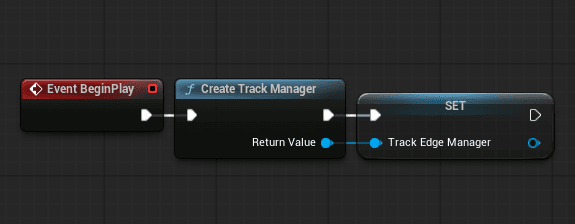
Create TrackEdge Manager
Node: Create Track Manager.
Recommended: Call this once in GameInstance or at BeginPlay.
Setup Example
Important
- Leave Server URL and API Key empty to automatically use Project Settings.
- Project Settings location:
Edit → Project Settings → Plugins → TrackEdge
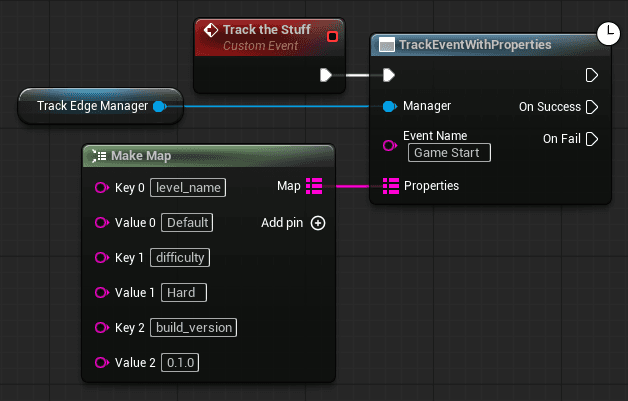
Track Event With Properties
Node: Track Event With Properties.
Used for tracking any custom gameplay event.
When to Use
- Level start / completion
- Enemy killed
- Ability used
- Button clicked
- Mission completed
Best Practice
Keep event names:
- lowercase
- underscore separated
- consistent across the project
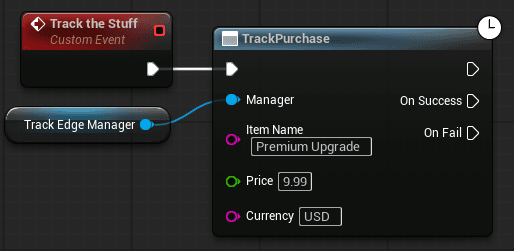
Track Purchase
Node: Track Purchase.
Used for tracking in game purchases or monetization events.
Example
Automatically Sends
- item_name
- price
- currency
- persistent player ID
Custom Sessions
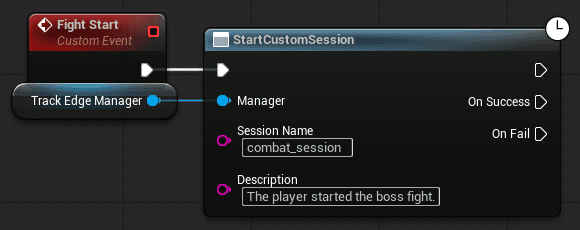
Custom Sessions allow you to measure time between two gameplay states.
• Start Custom Session
Node: Start Custom Session
Example:
• End Custom Session
Node: End Custom Session
Must use the same session name:
Session Name: "combat_session"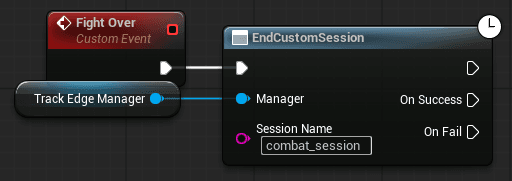
What TrackEdge Does Automatically
- Stores start time
- Calculates duration
- Sends
duration_seconds - Prevents duplicate active sessions
Set Person Properties
Automatically attaches default player metadata to the current player profile. This node collects useful system information and sends it as persistent player properties.
Node: SetPersonProperties
Example:

What It Automatically Sends
- When executed, TrackEdge attaches:
- engine_version
- language
- os
- platform
- project_name
- build_version
• Important
- You do not need to manually provide any data.
- TrackEdge automatically collects everything internally.
Persistent Player ID (Automatic)
TrackEdge automatically:
- Generates a unique player ID
- Saves it using Unreal SaveGame
- Reuses it across sessions
You do NOT need to manage player identity manually.
Platform Support
TrackEdge works on any platform supported by Unreal Engine’s HTTP module, including:
- Windows
- Mac
- Linux
- Android
- iOS
- Dedicated Server builds
## Thread Safety

TrackEdge uses Unreal’s HTTP module and executes callbacks on the game thread.
It is safe to call tracking functions from gameplay code.
Upcoming Features
TrackEdge is just getting started. We’re actively working on powerful improvements to make it even more production ready and developer friendly.
C++ Usage
TrackEdge can also be used directly in C++.All functions are non-blocking and use Unreal’s HTTP system internally.You can optionally handle success and error callbacks.