
Capture Replay Events
Mark important gameplay moments during a replay session.
Capture Replay Events
Capture Replay Events allow you to insert important gameplay markers into a replay session.
Instead of only seeing where the player moved, you can now identify exactly where important gameplay events occurred such as player deaths, player spawning, level transitions, checkpoints, boss fights, and more.
Replay Events do not start or stop replay recording. They simply create markers inside an active replay session.
Supported Event Types
| Event | Description |
|---|---|
| Player Start | Automatically created when a replay session begins. |
| Session Replay | Automatically created whenever a new replay starts after a level transition. |
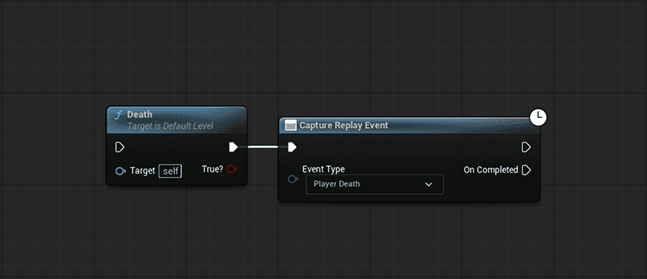
| Player Death | Marks where the player died. |
| Player Leave | Marks when the player exits the game. |
| Custom Event | Used for any gameplay event defined by the developer. (upcoming) |
Blueprint Node
Use the Capture Replay Event Blueprint node whenever you want to mark an important gameplay moment.
Automatic Events
TrackEdge automatically creates several replay events.
- Player Start
- Session Replay
- Player Leave
No Blueprint setup is required.
Manual Events
Developers can manually capture replay events using Blueprint or C++.
Common examples include:
- Player Death
- Boss Fight Started
- Boss Defeated
- Checkpoints
- Puzzle Solved
- Objectives Completed
- Any custom gameplay event
Replay Viewer
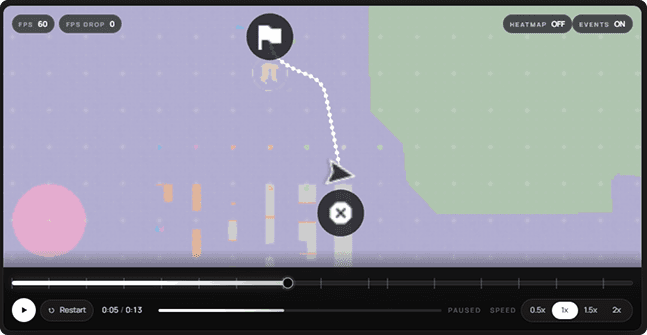
Captured replay events appear directly inside the Replay Viewer as timeline markers.
This allows you to instantly jump to important gameplay moments without manually scrubbing through the replay.
Best Practices
- Capture Player Death whenever the player dies.
- Use Custom Events for major gameplay moments only.
- Allow TrackEdge to handle automatic replay events whenever possible.
- Keep event usage meaningful to avoid cluttering the replay timeline.
Next
You're now ready to integrate TrackEdge into your gameplay code.
➡️ Blueprint Nodes